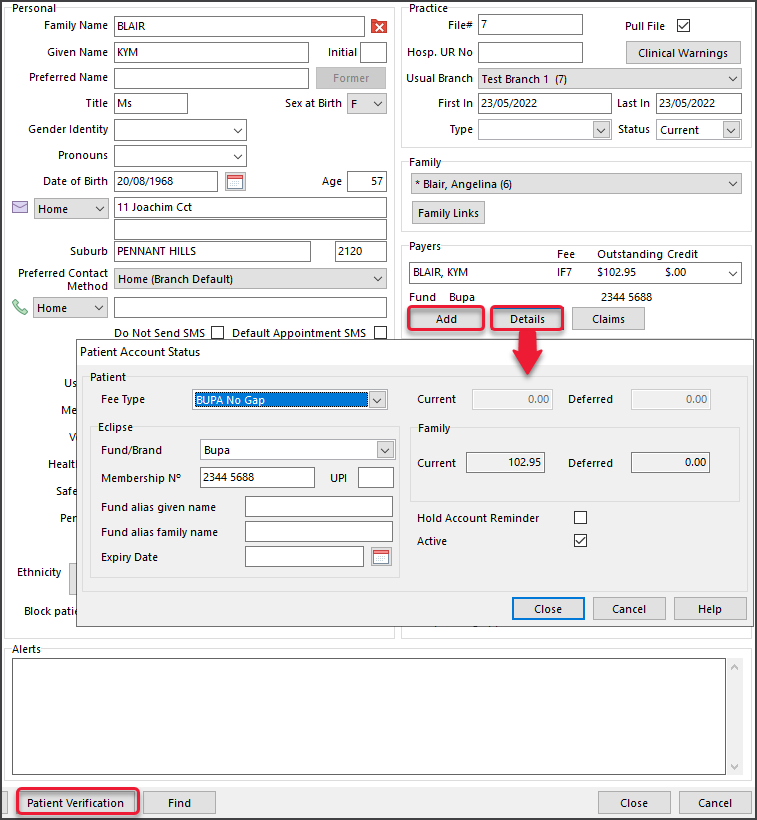
Add a health fund to a patient's record as a payer. This is set up by making the patient the payer and having the health fund under the patient's payer details. When the invoice is created, ECLIPSE will be the billing option and submit the claim to the fund.
Prerequisites
- If the fund does not exist in Zedmed, it must be added as per the Create a new payer guide.
- The ECLIPSE schemes must also be added to any specialists, as per the fund's ECLIPSE scheme guide.
To set up a patient with a health fund:
- Locate the patient and open their record.
- Under Payers, select Add.
The Account Payer Selector will open. - Select Patient.
- Under Fee Type, select the health fund (the health fund's fee type).
- Click Select.
The patient will be added as the payer. - Select the Details button under the patient.
The Patient Account Status screen will open. - Check that the fund's Fee Type is selected.
- Under Eclipse, select the Fund/Brand and fill in the details, including:
- The patient's health fund member's individual Membership number.
- Optional: The patient's UPI number, if available. The UPI field is the patient's position on the card.
- Most funds do not have an expiry date.
- Select Close to save and exit.
-
Perform a Patient Verification to check the information is valid for Medicare.
The fund's name will now appear below the patient.