
Payment Gateway is a Zedmed integration with Tyro eCommerce that allows practices to request patients' payment card information for ongoing attendances, appointment deposits, and did-not-attends. The card can be requested via SMS or when the patient uses OLA.
Tyro eCommerce manages the payments to providers' accounts. Zedmed does not store credit card information - it uses a secure token provided by Tyro.
For in-depth instructions, see our Payment Gateway guides.
How does a practice get access?
The Payment Gateway is requested via an Online Request Form, which starts the onboarding process. Zedmed uses the information provided in the form to advise Tyro, who will send out eCommerce Account applications. Once Tyro processes the applications, they will send confirmation emails, and Zedmed will set up your Payment Gateway.
Who is Payment Gateway for?
Facilities that bill private patients, including:
- Telehealth billing
- Deposits and prepayments
- Billing for no-shows / did not attends
- Practitioners with their own bank accounts
- Practitioners who work from home
- Zedmed Online Appointment customers
What are the Payment Gateway requirements
- Payment Gateway requires Zedmed v37.7.4 or later.
- SMS payment information requests require ZedSMS and use SMS credits.
- Each bank account owner requires an ABN and will be set up as a merchant by Tyro eCommerce
How does Payment Gateway work?
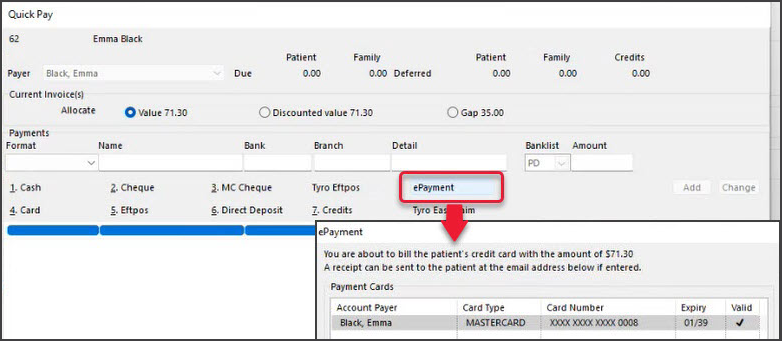
If a patient does not have a credit card on file, they can be sent an SMS card request when booking an appointment or be asked to enter credit card details when using Online Appointments. A patient's card can be billed without them being present using the ePayment option on the invoice screen. Patients with credit cards on file will display a card icon in the Appointment Grid.
What are the costs?
Payment Gateway is a free feature available in Zedmed v37.7.4 and later. SMS payment card requests require ZedSMS. The practice or practitioner is charged a % payment fee. See below.
How do fees work?
Tyro charges the practice or practitioner a % fee for eCommerce payments. The fee is charged once a month to the account that receive the payments. The fee is calculated as a % of the total consultation cost (including GST if applicable). It will not appear on the Zedmed invoice or the patient receipt.
How do practice/practitioner bank accounts work?
The total amount billed, including the fee, is deposited into the practice/practitioner's bank account the next business day, and Tyro withdraws these fees from the bank account every 30 days, from the day the bank account owner receives their confirmation emails from Tyro.
Where does the patient's payment go?
Tryo sends the payment to the bank account linked to the treating doctor (selected in the invoice screen). This could be the practice or the doctor's bank account.
How do I contact Tyro if I need help?
Call Tyro on with your Merchant ID 1300 01 8976, option 5.
How does reception know when to request a credit card?
When an appointment is booked, a credit card icon appears on the Appointment Details screen, Appointment Grid and Waiting Room to confirm the patient has a card on file. Following the consultation, billing can be processed using Zedmed’s ePayment option. Staff can also view all saved cards and their expiry dates via the Payment Cards section in Patient Details.

How is the patient billed in Zedmed
Billing is for private patients and ePayment is the payment type. All valid credit cards provided by the patient and third-party payers will be available for selection when billing. MA Online can also be used if a rebate is valid. A receipt will be emailed to the patient.
How do deposits and no-show charges work?
A receipt can be created using ePayment as the payment type. This receipt can then be applied as a credit when the invoice is raised. For missed appointments, a 'Did Not Attend' item can be created to charge against. Learn more
How are refunds processed?
Zedmed v38.6 and later, refunds are performed in Zedmed's Account Enquiry screen, as explained in the ePayment refunds guide.
Zedmed 38.2.2 and earlier, refunds are performed in Tyro eCommerce, then in Zedmed, as explained in the manual refunds guide.
Is there a charge for refunds?
The full amount is refunded to the patient. There are no penalty fees for refunds.
What happens if you charge using ePayment and there are insufficient funds on the card?
The payment will be rejected with a Payment Declined message. If the reason is not clear, it will display Unknown or Unspecified. An Expired Card will also fail with an Expired Card message.
How does Payment Gateway comply with the Government surcharge ban coming into effect in October 2026?
Tyro will be making changes to comply with the surcharge ban before it takes effect. Learn more here.
How does it work with OLA bookings?
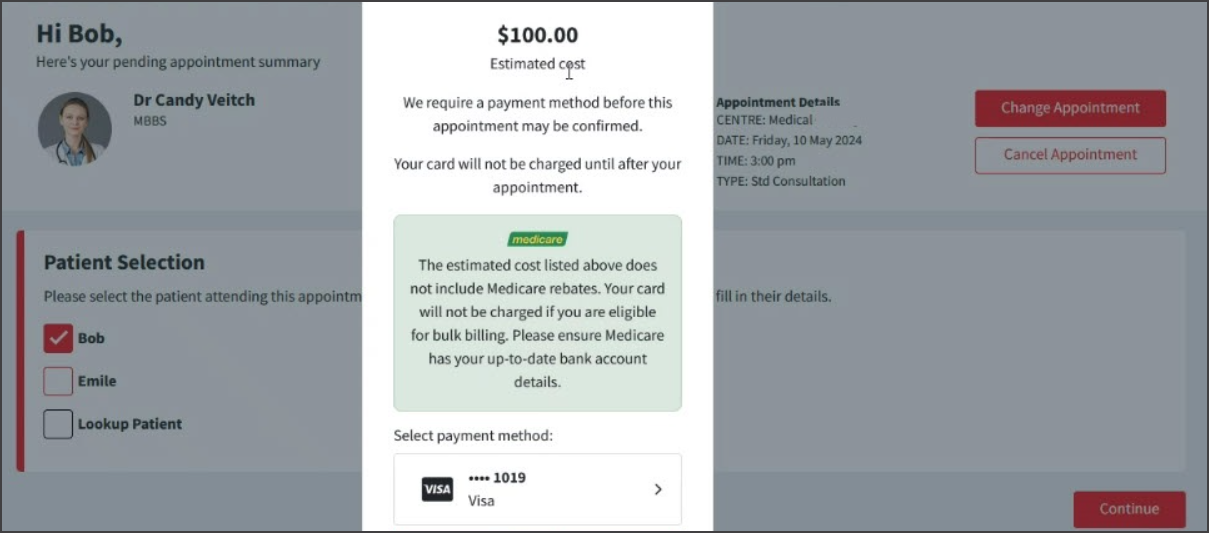
The first time a patient makes a booking, they can be asked to provide a credit card. When the appointment is booked, the patient's card is charged then refunded $1. Once a card is recorded in Patient Details, the patient will not be prompted again. The practice can display any applicable fees and an estimated consultation cost in OLA. To learn more, see the OLA with Payment Gateway guide.
How does Payment Gateway appear in Banking?
On banking reports, Payment Gateway shows as an ePayment. The Payment Gateway Reconciliation Report can be run to resolve discrepancies.
How are credit cards managed?
Zedmed does not store credit cards. The Payment Cards menu in the Patient record (Office) only shows the card's Type (e.g. Mastercard) the last four digits and expiry date. The practice has no other information. Tyro manages the credit cards and processes the payments when Zedmed invoices the patient.
Can multiple credit cards be used?
A patient can have multiple credit cards on record if they provide different cards for different card requests. In OLA, a card is requested when the patient makes their first appointment, and that card becomes the primary (default) card for that appointment. When invoicing, any valid card on record for the Payment Gateway can be selected.
How long can a credit card be charged for?
A credit card can be charged by the practice until the card's expiry date or until it is removed from the patient's Patient Cards menu (Patient Details) by a practice admin.
Can a card be added to a child's patient record?
If a next of kin (NOK) provides a credit card for a child, that card will be added to the child's profile (Payment Cards tab in Patient Details) and the NOK will show as the payer.
How can we track what card requests have been sent?
All SMS messages sent to request credit card information will show in Message Manager (Management tab > Messages) as Payment Details Link, and there is a filter with the same name.
Why can't I see Payment Gateway?
Most of the Payment Gateway options are not visible in Zedmed until Payment Gateway has been set up.
Payment Gateway at a glance
1) Book an Appointment and check for a credit card.
2) SMS the patient a credit card request - if required.
3) Bill the patient using ePayment and email receipt.
